 |
| Best Portable Receipt Scanners for Small Business in 2026 |
Looking for the best portable receipt scanner for your small business? We compare the top compact scanners for receipts, invoices and documents, including OCR, wireless scanning and portable workflows.
Quick Answer
For most small-business owners who frequently scan receipts and invoices, the Epson RapidReceipt RR-70W is the most purpose-built option in this comparison. If you need two-sided scanning, the Brother DS-940DW is a stronger fit. For simple wireless mobile scanning, the Epson WorkForce ES-60W is worth considering.
Receipts are easy to lose and surprisingly difficult to organize once a small business starts generating dozens or hundreds of them every month.
Whether you are a freelancer, contractor, consultant, real-estate professional or small-business owner, a portable scanner can turn paper receipts and invoices into searchable digital files without taking up much desk space.
The important part is choosing the right scanner. Some portable models are designed primarily for occasional documents, while others are specifically built around receipts, invoices, OCR and financial workflows.
In this guide, we'll compare the best portable receipt scanners for small businesses in 2026 and explain which type makes sense for different workflows.
Table of Contents
Why Small Businesses Need a Portable Receipt Scanner
A smartphone camera can work for an occasional receipt, but a dedicated scanner becomes much more useful when document scanning becomes a regular part of your business workflow.
- Scan receipts without taking photos manually
- Create cleaner digital documents
- Convert paper documents into searchable PDFs
- Use OCR to extract text from receipts and invoices
- Reduce paper clutter in your office
- Keep business documents organized for future reference
- Make it easier to transfer documents into accounting workflows
Portability is particularly useful for professionals who work from multiple locations. You can keep a compact scanner in a home office, vehicle, travel bag or client workspace.
What to Look for in a Portable Receipt Scanner
1. OCR Support
OCR, or optical character recognition, converts text inside a scanned document into machine-readable text.
For receipts, OCR can be particularly useful because it can help turn paper information into searchable and editable digital content.
2. Wireless Connectivity
Wireless connectivity can be useful if you regularly scan from a laptop, smartphone or tablet without wanting to connect a cable every time.
3. Duplex Scanning
Duplex scanning means the scanner can capture both sides of a document. It matters more for invoices, forms and multi-page documents than for simple one-sided receipts.
4. Battery Operation
A battery-powered scanner is useful for consultants, contractors and other professionals who don't always work next to a power outlet.
5. Software and Accounting Compatibility
If you plan to use scanned receipts with accounting software, check the included software and supported export workflows before buying.
Best Portable Receipt Scanners for Small Business in 2026
Epson RapidReceipt RR-70W

The Epson RapidReceipt RR-70W is the most specialized scanner in this list for small-business receipt and invoice workflows.
Its current Amazon listing highlights ScanSmart AI PRO technology, receipt and invoice data extraction, financial-software workflows, wireless scanning, searchable PDF creation and a compact USB-or-battery-powered design. Amazon currently lists the scanner at under 11 ounces and up to 15 pages per minute in automatic feeding mode.
Best for: Small businesses focused on receipts and invoices
Connectivity: USB + Wi-Fi
Scanning: Up to 15 ppm
OCR: Yes
Power: USB or battery
Why buy it: It is specifically designed around business receipts, invoices and document digitization rather than being just a general-purpose portable scanner.
Potential limitation: It is a single-sheet mobile scanner, so businesses scanning large batches of documents may want a larger desktop scanner instead.
Check Epson RR-70W on AmazonBrother DS-940DW
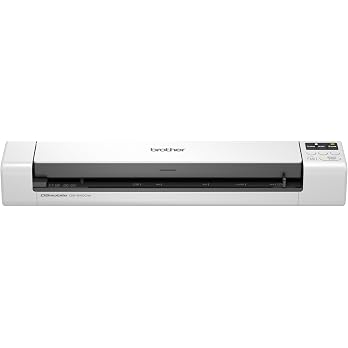
The Brother DS-940DW is a strong choice if your business needs more than receipt scanning. It supports two-sided scanning, wireless connectivity and OCR workflows in a very compact design.
Brother's Amazon listing states that it can scan color and monochrome documents at up to 16 pages per minute and supports documents up to 72 inches long. It can also handle business and plastic ID cards.
Best for: Businesses scanning receipts plus two-sided documents
Scanning: Up to 16 ppm
Duplex: Yes
Wireless: Yes
OCR: Supported
Why buy it: Duplex scanning gives it more flexibility than a receipt-focused single-sheet scanner.
Potential limitation: If your workflow is almost entirely receipts and invoices, the Epson RapidReceipt software ecosystem may be a better fit.
Check Brother DS-940DW on AmazonEpson WorkForce ES-60W

The Epson WorkForce ES-60W is a compact wireless scanner designed for professionals who need basic document scanning away from a traditional office setup.
Its Amazon listing describes it as a wireless mobile single-sheet scanner with battery operation and scanning as fast as four seconds per page. It can wirelessly scan to Windows PCs, Macs, iOS and Android devices.
Best for: Freelancers and professionals who want simple mobile scanning
Connectivity: Wi-Fi + USB
Power: Battery or USB
OCR: Included software
Design: Compact single-sheet scanner
Why buy it: Its small size and wireless operation make it practical for people who frequently move between locations.
Potential limitation: It is better suited to light mobile scanning than large receipt batches or heavy office workloads.
Check Epson ES-60W on AmazonPortable Receipt Scanner Comparison
| Scanner | Best For | Wireless | Duplex | OCR |
|---|---|---|---|---|
| Epson RR-70W | Receipts & invoices | Yes | No | Yes |
| Brother DS-940DW | Receipts + documents | Yes | Yes | Yes |
| Epson ES-60W | Mobile scanning | Yes | No | Yes |
Portable Receipt Scanner vs Smartphone: Which Is Better?
For a few receipts each week, a smartphone may be all you need. Modern phones have excellent cameras and can produce high-quality document scans with the right software.
A dedicated portable scanner becomes more attractive when scanning is a routine business task.
Choose a smartphone if: You scan only a few receipts and want the lowest upfront cost.
Choose a portable scanner if: You regularly scan receipts, invoices and documents and want a repeatable workflow.
How OCR Makes Receipt Management Easier
Scanning a receipt creates a digital image or document. OCR takes the process one step further by identifying text inside that document.
That can make it easier to search for information later instead of opening dozens of image files manually.
A typical workflow can look like this:
- Scan the paper receipt.
- Create a digital image or PDF.
- Run OCR on the scanned document.
- Review the extracted text.
- Save the searchable document.
- Organize the file with your business records.
Where ConvertlyFiles Fits Into the Workflow
A scanner handles
Comments
Post a Comment